



LogoHushgen

GPT Image 2.6 AI Image Generator

Use GPT Image 2.6 on Hushgen online, with nothing to install. Create 1K, 2K or 4K images and short animated GIFs from a text prompt, or edit pictures with up to 9 reference images. Try it with 50 free credits, then use one shared credit balance across Hushgen's image and video models.

  • Animated GIF output
  • 1K, 2K and 4K
  • 5 quality levels
  • Edit with up to 9 images

GPT Image 2.6 examples: images and GIFs

GIFs and pictures made with GPT Image 2.6 on Hushgen, next to official OpenAI samples. Each card says where it comes from; select one made on Hushgen to see its exact prompt.

What is GPT Image 2.6?

GPT Image 2.6 is an image generation and editing model developed by OpenAI and released on November 4, 2026. It comes in two versions, Flare for fast iteration and Sunburst for detailed work, creates and edits images from text and image inputs, and can return short animated GIFs. Hushgen runs GPT Image 2.6 Flare.

animated output, 2 to 16 frames
GIF
still-image resolution on Hushgen
1K–4K
quality levels, from Low to Max
5
reference images per edit on Hushgen
9

Two Hushgen tools: Text to Image and Image Edit

In Text to Image, write a prompt and choose Image or GIF, a resolution, an aspect ratio and a quality level. In Image Edit, upload up to 9 pictures, describe the change and choose Image or GIF. Both return up to 4 results per run, and the credit cost is shown before you generate.

No OpenAI account or ChatGPT plan needed

You do not need an OpenAI account or a ChatGPT subscription. Hushgen credits work with GPT Image 2.6 and with every other model on the site, including GPT Image 2, Nano Banana Pro and Moss Image, so one plan covers several image models.

From OpenAI’s announcement
“GPT-Image-2.6 Flare generates and edits images from text and image inputs.”
“Use it for interactive image generation and editing workflows.”

Source: OpenAI: GPT-Image-2.6 Flare model page (developer docs)

Hushgen is an independent platform that offers GPT Image 2.6. Hushgen is not affiliated with or endorsed by OpenAI.

GPT Image 2.6 at a glance

Updated
Model
GPT Image 2.6 (Flare version on Hushgen)
Developer
OpenAI
Released
November 4, 2026
Versions
Flare (fast, on Hushgen) and Sunburst (detail, not on Hushgen yet)
Tools on Hushgen
Text to Image, Image Edit
Output
PNG (default), JPEG, WebP or animated GIF, in both tools
Resolution on Hushgen
Images: 1K, 2K or 4K. GIFs: smaller frames, about 250–1280 px on the long side
Aspect ratios
1:1, 3:2, 2:3, 3:4, 4:3, 4:5, 5:4, 9:16, 16:9, 21:9
Quality
Low, Medium, High, Extra high, Max
GIF settings
Text to Image: 2–16 frames, 20–2000 ms per frame (default 9 × 200 ms). Image Edit: fixed 9 × 200 ms
Results per run
1 to 4
Reference images (Image Edit)
Up to 9
Seed
Not available
Price on Hushgen
12 credits (1K, Low) to 340 credits (4K, Max) per image

GPT Image 2.6 key features

What GPT Image 2.6 does, shown with GIFs and pictures made on Hushgen and with official OpenAI samples. Each picture says where it comes from.

Animated GIFs from a text prompt

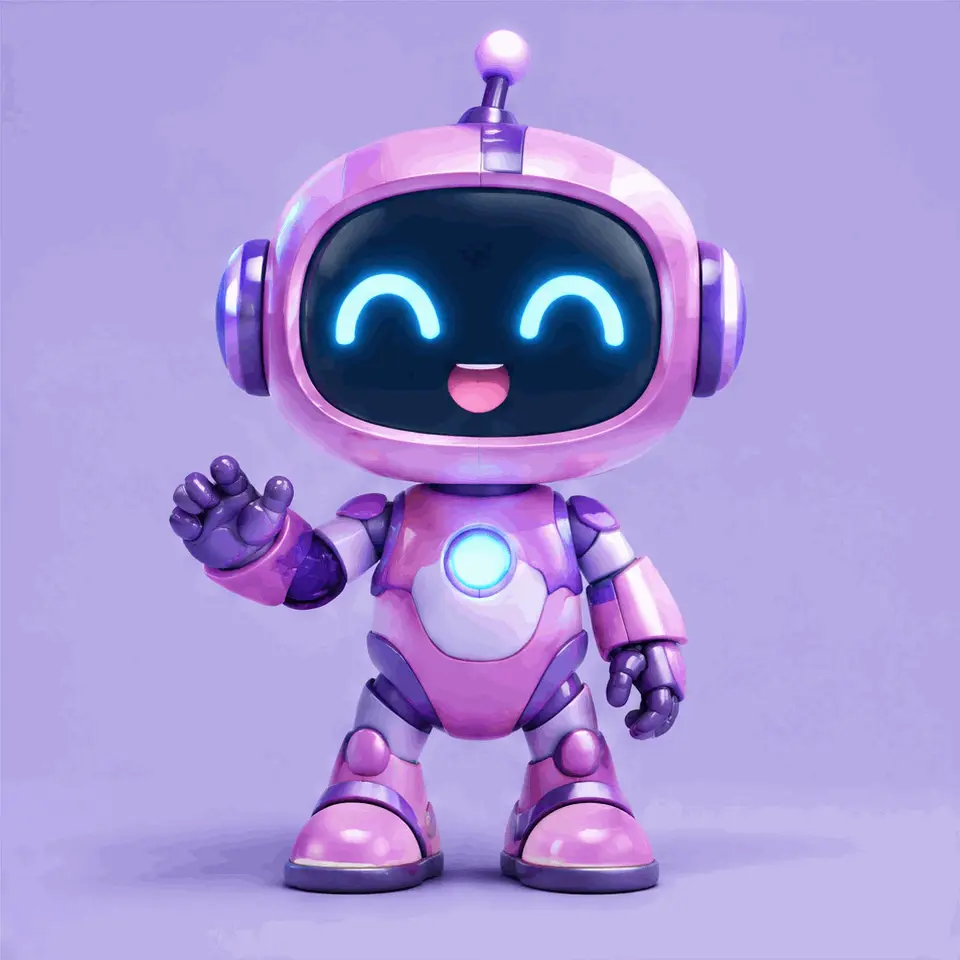
Choose GIF instead of Image and GPT Image 2.6 returns a short looping animation. Both loops here were made on Hushgen: a waving mascot and steam rising from a cup.

  • Describe one action: the starting pose, the movement and the return to the start
  • 2 to 16 frames and 20 to 2000 ms per frame; the default is 9 frames × 200 ms (1.8 seconds)
  • A GIF costs the same as a still image at the same resolution and quality
  • Image Edit can animate an uploaded picture too; edit GIFs always use 9 frames × 200 ms

Focused edits that keep the rest

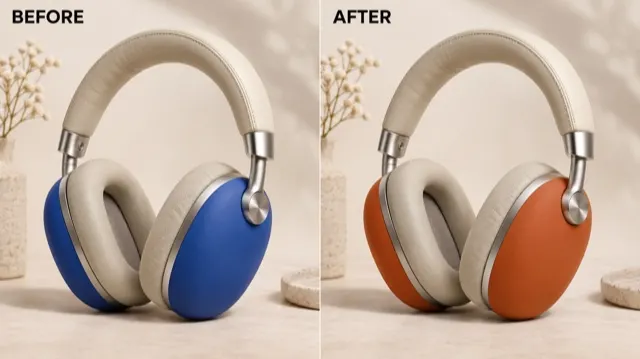
In Image Edit, say what to change and what must stay. Here only the color of the headphones changes; the shape, materials and setting stay the same.

  • Name the exact part to change and the details to keep
  • Compare the result with the original before you publish
  • A 1K Medium edit with one picture costs 26 credits

The same character or product in a new scene

Keep a character or product recognizable while you change the background, lighting or story around it.

  • Upload the character or product and describe the new scene
  • Say which features must not change: face, colors, logo, proportions
  • Run several results at once (up to 4) and keep the best

Several reference pictures in one edit

Give each picture a role, for example a person and three pieces of clothing. This official OpenAI sample was made with the Sunburst version; on Hushgen, the same kind of edit runs on Flare with up to 9 pictures.

  • Say which picture is the person and which are the items
  • Each picture beyond the first adds 6 credits per result
  • Check faces and details against the inputs

Exact words in posters and campaigns

Put the words in quotes, say how often they appear and where. This official OpenAI sample made with Flare places one slogan in a streetwear campaign.

  • Quote the exact wording and its position
  • Ask for no other slogans or brand marks
  • Proofread small or dense text before you publish

Five quality levels from 1K to 4K

Draft at Low and finish at High, Extra high or Max. This boat was made on Hushgen at 3:4, 2K and Medium for 40 credits.

  • 1K costs 12 credits at Low and 20 at Medium
  • 4K costs 72 credits at Medium and 340 at Max
  • Extra high and Max take longer, often over a minute

Up to 4 results per run

Choose 1 to 4 outputs in Text to Image or Image Edit. Each result is a separate generation, billed per result.

PNG, JPEG, WebP or GIF

PNG is the default. JPEG and WebP give smaller files. The format does not change the price.

Ten aspect ratios

From 21:9 ultra-wide to 9:16 vertical, for banners, posts, stories and thumbnails. The aspect ratio does not change the price.

What you can do with GPT Image 2.6 on Hushgen

GPT Image 2.6 runs in two Hushgen tools. Each one lists GPT Image 2.6 in its model menu.

Inputs and outputs

ToolYou provideYou get
Text to ImageA text prompt. Optional: Image or GIF, resolution, aspect ratio, quality, output format, GIF frames and frame duration.Up to 4 images (PNG, JPEG or WebP) at 1K, 2K or 4K, or animated GIFs with smaller frames (about 250–1280 px).
Image EditUp to 9 pictures and a prompt that says what to change and what to keep. Optional: Image or GIF, resolution, aspect ratio, quality and output format.Up to 4 edited images (PNG, JPEG or WebP) at 1K, 2K or 4K, or animated GIFs with smaller frames.

How to generate an image with GPT Image 2.6

  1. 1

    Open the generator

    Use the generator at the top of this page, which opens on Text to Image with GPT Image 2.6 selected. For edits, switch to Image Edit and keep GPT Image 2.6 in the model menu.

  2. 2

    Choose Image or GIF

    In Settings, Output is the first option: Image for a still picture, GIF for a short loop. For a GIF, describe one action, how it moves and how it returns to the start.

  3. 3

    Pick resolution, ratio and quality

    Choose 1K, 2K or 4K and one of 10 aspect ratios. Quality, output format and GIF frames are in Advanced settings. The credit cost updates before you generate.

  4. 4

    Generate and download

    Sign in and select Generate. Credits are deducted when the task starts and returned automatically if the generation fails. Download the result or find it later in My Creations.

GPT Image 2.6 prompt examples

Describe the subject, the setting and the style in plain language. Put any text you want in the picture in double quotes.

Waving mascot GIF

Text to Image

GIF · 1:1 · 4K · Medium · 9 frames × 200 ms

A cheerful round robot mascot in glossy pink and violet with big glowing eyes stands on a soft lilac studio background. It raises its right hand, waves twice, blinks, then lowers the hand and returns to the opening pose for a seamless loop. Fixed camera, clean 3D render style, soft studio light.


Cozy coffee loop GIF

Text to Image

GIF · 16:9 · 4K · Medium · 9 frames × 200 ms

A ceramic coffee cup on a wooden cafe table next to a rainy window. Steam rises and curls above the cup, raindrops slide down the glass and the warm lamp light glows softly. Fixed camera, cozy photographic style, the last frame returns to the first for a seamless loop.

Animated sale sticker

Text to Image

GIF · 1:1 · 4K · Medium · 8 frames × 150 ms

A bold flat-design sticker badge in magenta with the words "NEW DROP" in thick white letters, on a plain dark navy background. The badge pops in slightly larger, wobbles left and right, small sparkles flash around it, then it settles back to its starting size for a seamless loop. No other text.

Fashion campaign with an exact slogan

Text to Image

Image · 3:4 · 2K · Medium

Design a polished fashion campaign for Thread featuring a relaxed group of young adult friends in an urban setting. Place the words "Yours to Create." once in a prominent, readable position. Keep clothing contemporary, poses natural, and the color palette deliberate. Include no additional slogans or unrelated brand marks.

GPT Image 2.6 pricing

GPT Image 2.6 is billed in Hushgen credits per image, and the price depends on the resolution and the quality. Credits are shared with every model and come with plans and credit packs.

GPT Image 2.6 credits per image for Text to Image
ResolutionLowMediumHighExtra highMax
1K12 credits20 credits24 credits44 credits100 credits
2K24 credits40 credits48 credits84 credits188 credits
4K40 credits72 credits84 credits152 credits340 credits
  • Prices are per image in Text to Image. A GIF costs the same as a still image at the same resolution and quality, whatever the number of frames. The aspect ratio and output format do not change the price.
  • Image Edit costs a little more because the price includes one input picture: 26 credits for a 1K Medium edit, 78 at 4K Medium. Each extra picture adds 6 credits per result. The output format, GIF included, does not change the Image Edit price.
  • With several results per run, the price is multiplied by the number of results.
  • Credits are deducted when the task starts and returned automatically if the generation fails.
  • New accounts get 50 free credits to try Hushgen, enough for 4 images at 1K Low.
See plans and credit packs

GPT Image 2.6 vs GPT Image 2 on Hushgen

Both OpenAI models are available on Hushgen. This table compares what each offers on Hushgen and what it costs; it does not rank image quality, which depends on your prompt.

FeatureGPT Image 2.6GPT Image 2
Animated GIF outputYesNo
Quality levelsLow, Medium, High, Extra high, MaxLow, Medium, High
Resolution on Hushgen1K, 2K, 4K1K, 2K, 4K
Output format choicePNG, JPEG, WebP or GIFNot selectable
Reference images in Image EditUp to 91
1K Medium image20 credits24 credits
4K High image84 credits264 credits

Choose GPT Image 2.6 for GIFs, multi-picture edits and the Extra high or Max quality levels.

Try the same prompt in both models at 1K first: drafts cost little, and you can compare the results side by side.

Limitations

What GPT Image 2.6 on Hushgen does not do, so you can decide whether it fits your project.

  • Hushgen runs the Flare version of GPT Image 2.6. Sunburst is not available on Hushgen yet; samples on this page made with Sunburst are labelled.
  • In Image Edit, GIFs always have 9 frames × 200 ms. Frame count and frame duration can be set in Text to Image only.
  • GIF frames are smaller than the resolution suggests. In our tests the long side was about 250–480 px at 1K, 500–900 px at 2K and 960–1280 px at 4K, smaller with more frames. The price follows the resolution you choose.
  • A GIF has at most 16 frames, so it suits short loops, not videos. For longer motion, use a video model.
  • SVG output, the complexity setting, masks and markup overlays are offered by OpenAI but not on Hushgen.
  • Image Edit accepts up to 9 pictures on Hushgen; the model itself accepts up to 16.
  • There is no seed, so the same prompt gives a different result each time.
  • Small or dense text can contain mistakes. Check the words before you publish.
  • Content that breaks our Acceptable Use Policy may be rejected by moderation.

GPT Image 2.6 FAQ

What is GPT Image 2.6?

GPT Image 2.6 is an image generation and editing model developed by OpenAI and released on November 4, 2026. It comes in two versions, Flare for fast iteration and Sunburst for detailed work. It creates and edits images from text and image inputs and can return short animated GIFs.

Where can I use GPT Image 2.6 online?

You can use GPT Image 2.6 on Hushgen, directly in the browser, in Text to Image and Image Edit. The generator at the top of this page opens with GPT Image 2.6 selected. Nothing needs to be installed.

Do I need an OpenAI account or a ChatGPT subscription?

No. Hushgen runs GPT Image 2.6 for you and bills it in Hushgen credits, so you only need a Hushgen account and credits. You do not need an OpenAI account or a ChatGPT plan.

Is Hushgen the official GPT Image 2.6 website?

No. Hushgen is an independent platform that offers GPT Image 2.6. It is not affiliated with or endorsed by OpenAI.

Which version of GPT Image 2.6 does Hushgen use, Flare or Sunburst?

Hushgen uses Flare, the faster version. Sunburst, the version for more detailed work, is not available on Hushgen yet. Some official samples on this page were made with Sunburst, and they are labelled as such.

How do I make a GIF with GPT Image 2.6?

In Text to Image or Image Edit, open Settings and choose GIF under Output. Describe one short action: how it starts, how it moves and how it returns to the start. In Text to Image, Advanced settings let you set 2 to 16 frames and 20 to 2000 ms per frame; the default is 9 frames at 200 ms, a 1.8-second loop. Image Edit can also return a GIF of an uploaded picture, always with 9 frames at 200 ms. GIF frames are smaller than the resolution suggests, about 960–1280 px on the long side at 4K in our tests.

How much does GPT Image 2.6 cost on Hushgen?

A 1K image costs 12 credits at Low and 20 at Medium; a 4K image costs 72 credits at Medium and 340 at Max. A GIF costs the same as a still image. Image Edit starts at 18 credits for one picture, plus 6 credits per extra picture. Credits come with monthly or yearly plans and one-time credit packs, listed on the pricing page.

Is GPT Image 2.6 free to use on Hushgen?

GPT Image 2.6 is not free without limits, but you can try it for free. New Hushgen accounts get 50 free credits, enough for 4 images at 1K Low. After that, each image costs credits.

Can I cancel my subscription or get a refund?

You can cancel a subscription yourself at any time in your account. If you have not used any credits from a payment, email [email protected] within 7 days of the charge for a full refund. A payment cannot be refunded once its credits have been used or after 7 days.

Can I use GPT Image 2.6 and other models with one subscription?

Yes. Hushgen credits work with every model on the site, including GPT Image 2.6, GPT Image 2, Nano Banana Pro and Moss Image, so you can compare models without separate subscriptions.

How many pictures can I upload to edit with GPT Image 2.6?

Up to 9 pictures per edit on Hushgen. Give each picture a role in the prompt, for example the person and the clothing items. The price includes the first picture; each extra picture adds 6 credits per result.

What resolutions and aspect ratios does GPT Image 2.6 support on Hushgen?

Still images come out at 1K, 2K or 4K in 10 aspect ratios: 1:1, 3:2, 2:3, 3:4, 4:3, 4:5, 5:4, 9:16, 16:9 and 21:9, and download as PNG (default), JPEG or WebP. GIFs use the same settings but have smaller frames: about 250–480 px on the long side at 1K, 500–900 px at 2K and 960–1280 px at 4K in our tests.

Can I use GPT Image 2.6 images commercially?

Commercial use of images generated on Hushgen is governed by Hushgen’s Terms of Service and your plan; paid plans include commercial usage rights. Read the Terms of Service for the details before you publish.

Is GPT Image 2.6 the same as Images 2.6 in ChatGPT?

They come from the same OpenAI release. Images 2.6 is the update in ChatGPT and Codex; GPT Image 2.6 Flare and Sunburst are the model versions released with it. Hushgen offers GPT Image 2.6 Flare, so you do not need ChatGPT to use it here.

Can I link to a prepared GPT Image 2.6 generation?

Yes. Add parameters to this page’s URL to pre-fill the generator, for example /gpt-image-2-6?model=openai/gpt-image-2.6-flare/text-to-image&prompt=A%20paper%20lantern%20that%20glows%20and%20dims%20in%20a%20loop. Supported parameters are model, tab (text-to-image or image-to-image) and prompt. Image or GIF, resolution, aspect ratio and quality are chosen in the generator, and the user selects Generate.