
LogoHushgen
Pricing38% OFF
LogoHushgen
  • Home
  • Video
  • Text to Video
  • Image to Video
  • Reference to Video
  • Video Extend
  • Motion Control
  • Image
  • Text to Image
  • Image Edit
Models
  • Seedance 2.5HOT
  • Kling 4.0New
  • Moss ImageNew
Library
  • My Creations
  • Plans & pricing
LogoHushgen

Moss Image AI Image Generator

Use Moss Image on Hushgen to turn a text prompt into a 1K, 1.5K or 2K image as JPEG, PNG or WebP, with clear English and Chinese text. No OpenMOSS account, install or GPU needed.

  • 1K, 1.5K and 2K output
  • 10 aspect ratios
  • English & Chinese text
  • JPEG, PNG or WebP
  1. Home
  2. /
  3. Moss Image

Made with Moss Image on Hushgen

Every image below was generated with Moss Image on Hushgen. Select an image to see the exact prompt and settings.

What is Moss Image?

Moss Image (officially written MOSS-Image) is a text-to-image model developed by the OpenMOSS team and released on October 16, 2026. It has 5 billion parameters, renders clear text inside images and accepts long natural-language prompts of up to 4K tokens.

resolution tiers on Hushgen
1K–2K
aspect ratios, from 21:9 to 9:16
10
output formats: JPEG, PNG, WebP
3
credits for a 1K image
8

One Hushgen tool: Text to Image

On Hushgen, Moss Image runs in Text to Image. Write a prompt, then choose an aspect ratio, a resolution (1K, 1.5K or 2K), an output format and an optional seed. Each generation returns one image, and the credit cost is shown before you generate.

No OpenMOSS account or GPU needed

You do not need to install the model, rent a GPU or sign up with OpenMOSS. Hushgen credits work with Moss Image and with every other model on the site, including Seedream 5.0 Lite, Nano Banana 2, GPT Image 2 and Wan 2.7, so one plan covers several image models.

From OpenMOSS’s announcement
“Generate clear, accurate text within images.”
“Accept text prompts of up to 4K tokens.”

Source: OpenMOSS: MOSS-Image repository and release note (October 16, 2026)

Hushgen is an independent platform that provides Moss Image through third-party API services. Hushgen is not affiliated with or endorsed by OpenMOSS.

Moss Image at a glance

Updated 2026-10-29
Model
Moss Image (MOSS-Image)
Developer
OpenMOSS
Released
October 16, 2026
Model size
5 billion parameters
Tool on Hushgen
Text to Image
Output
One image per generation: JPEG (default), PNG or WebP
Resolution on Hushgen
1K (about 1 MP), 1.5K (about 2.4 MP), 2K (about 4 MP)
Aspect ratios
1:1, 3:2, 2:3, 3:4, 4:3, 4:5, 5:4, 9:16, 16:9, 21:9
Seed
Optional; -1 for a random result
Price on Hushgen
8 credits at 1K, 16 at 1.5K, 32 at 2K
Account
Hushgen account required; no OpenMOSS account

Moss Image key features

What Moss Image is built for, shown with pictures generated on Hushgen. Select a picture to see the exact prompt and settings.

Clear text inside the image

OpenMOSS highlights strong text rendering: Moss Image is built to generate clear, accurate text within images. The pictures here use English and Chinese headlines, taglines, prices and calligraphy in one frame.

  • Put the exact words in double quotes in your prompt
  • English and Chinese can share one picture
  • Check small print before you publish: very small or dense text can contain mistakes

Long, detailed prompts

OpenMOSS says Moss Image accepts text prompts of up to 4K tokens, so one prompt can describe the subject, the layout, the lighting and every line of text. This movie poster came from a single prompt with a tagline, a title and a credit line.

  • Say where each piece of text goes: top, centre, bottom
  • Name colours, materials and lighting
  • Reuse any prompt from this page with Use this prompt

From 1K to 2K in ten aspect ratios

Use 1K for quick drafts, 1.5K for social and web graphics and 2K for detailed posters. Ratios run from 21:9 ultra-wide to 9:16 vertical, so one idea can become a thumbnail, a feed post or a story.

  • 1K is about 1 megapixel, 1.5K about 2.4 and 2K about 4
  • 1:1, 3:2, 2:3, 3:4, 4:3, 4:5, 5:4, 9:16, 16:9 and 21:9
  • The price depends on the resolution only, not on the aspect ratio

Repeatable results with a seed

Enter a seed to get the same image from the same prompt and settings. Leave it at -1 for a new variation every time.

JPEG, PNG or WebP

JPEG is the default. Choose PNG for lossless files or WebP for smaller downloads. The format does not change the price.

1K for drafts, 2K for the final

A 1K image costs 8 credits, so you can test prompts cheaply and render the final version at 1.5K (16 credits) or 2K (32 credits).

What you can do with Moss Image on Hushgen

Moss Image runs in one Hushgen tools. Each one lists Moss Image in its model menu.

Text to Image

Describe the picture, put any words you want inside it in double quotes, and Moss Image renders both the scene and the text.

Open Text to Image

Inputs and outputs

ToolYou provideYou get
Text to ImageA text prompt. Long, detailed prompts are supported. Optional: aspect ratio, resolution, output format and seed.One 1K, 1.5K or 2K image as JPEG, PNG or WebP, in one of 10 aspect ratios.

How to generate an image with Moss Image

  1. 1

    Open the generator

    Use the generator at the top of this page, which opens with Moss Image selected, or open Text to Image and choose Moss Image in the model menu.

  2. 2

    Write your prompt

    Describe the subject, the setting and the style. Put any words you want inside the picture in double quotes, and say where they go. Long, detailed prompts are supported.

  3. 3

    Choose the settings

    Pick an aspect ratio, a resolution (1K, 1.5K or 2K), an output format (JPEG by default, PNG or WebP) and, for repeatable results, a seed. The credit cost is shown before you generate.

  4. 4

    Generate and download

    Sign in and select Generate. Credits are deducted when the task starts and returned automatically if the generation fails. Download the image or find it later in My Creations.

Moss Image prompt examples

Describe the subject, the setting and the style in plain language. Put any text you want in the picture in double quotes.

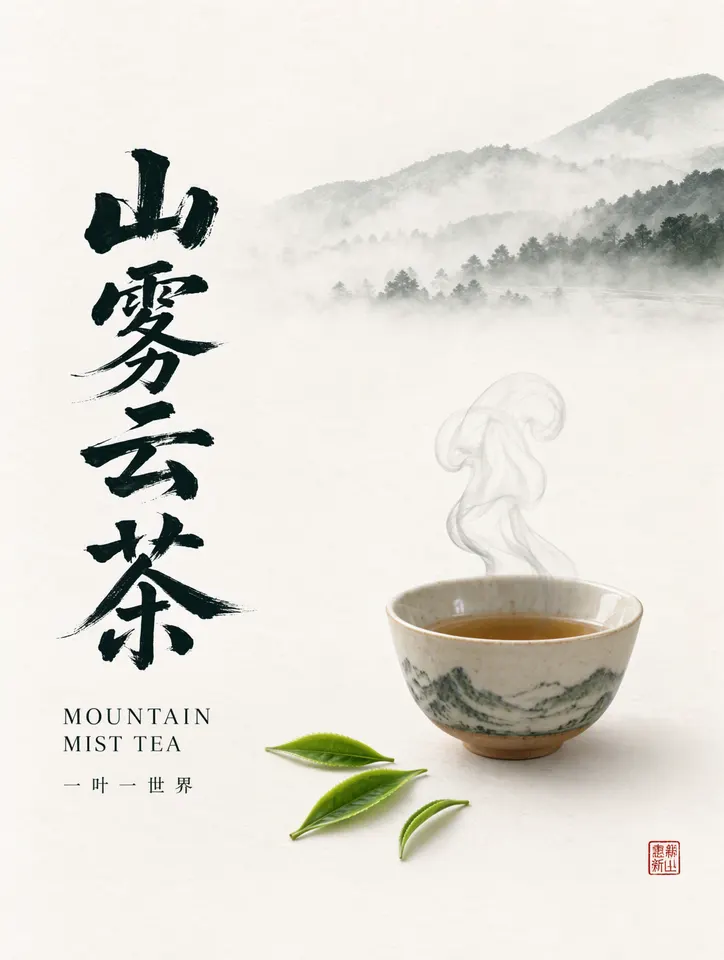
Chinese tea brand poster

Text to Image

3:4 · 1.5K

A premium Chinese tea brand poster in a minimalist ink-wash style. A large vertical Chinese calligraphy title "山雾云茶" in black brush strokes on the left, a smaller English subtitle "MOUNTAIN MIST TEA" in an elegant serif font below it, and a small tagline "一叶一世界". A ceramic teacup with rising steam and a few fresh green tea leaves on off-white textured paper, misty mountains painted in soft grey ink at the top, a small red seal stamp at the bottom right. Balanced layout with generous negative space, high-end print design.


YouTube thumbnail with bold text

Text to Image

16:9 · 1.5K

YouTube thumbnail. A surprised young creator wearing headphones points at a glowing laptop screen, vivid orange and teal background, bold chunky white text with a black outline on the left that reads "I TRIED AI FOR 7 DAYS" with the word "AI" in bright yellow, a red arrow pointing at the screen, high contrast, sharp, energetic composition.

Perfume advertisement

Text to Image

4:5 · 1.5K

Luxury perfume advertisement. A frosted glass perfume bottle with a pink-violet gradient liquid stands on a wet black stone, soft rim light, tiny water droplets, deep plum background with a gentle glow. Headline at the top in thin elegant sans-serif letters: "LUMINA", and below it in smaller letters "Eau de Parfum". At the bottom a small line: "Wear the light." Clean magazine layout, photorealistic product photography.

Vertical festival poster

Text to Image

9:16 · 1.5K

Vertical music festival poster with a neon pink and violet gradient. The huge bold title "夏日电音节" at the top, below it in English "SUMMER ELECTRONIC FESTIVAL 2026". The dates "7月18日-19日" and the venue "上海 · 滨江公园" in clear mid-size letters. A silhouetted crowd with raised hands in front of the stage, laser beams and light haze, no small print and no lineup list. Vibrant, energetic print design.

Moss Image pricing

Moss Image is billed in Hushgen credits per image, and the price depends on the resolution. Credits are shared with every model and come with plans and credit packs.

Moss Image credits per image for Text to Image
ResolutionPer imageOutput size
1K8 creditsAbout 1 megapixel (1024 × 1024 at 1:1)
1.5K16 creditsAbout 2.4 megapixels (1536 × 1536 at 1:1)
2K32 creditsAbout 4 megapixels (2048 × 2048 at 1:1)
  • Moss Image costs 8 credits at 1K, 16 at 1.5K and 32 at 2K per image. The aspect ratio and the output format do not change the price.
  • Credits are deducted when the task starts and returned automatically if the generation fails.
  • New accounts get 50 free credits to try Hushgen, enough for 6 images at 1K, 3 at 1.5K or 1 at 2K.
See plans and credit packs

Moss Image vs Nano Banana 2 on Hushgen

Both models are available in Text to Image on Hushgen. This table compares what each offers on Hushgen and what it costs; it does not rank image quality, which depends on your prompt.

FeatureMoss ImageNano Banana 2
DeveloperOpenMOSSGoogle
Resolution on Hushgen1K, 1.5K, 2K1K, 2K, 4K
Aspect ratios on Hushgen10 (1:1 to 21:9 and 9:16)7 (1:1, 16:9, 9:16, 4:3, 3:4, 3:2, 2:3)
Output formatJPEG, PNG or WebPPNG
1K image8 credits28 credits
2K image32 credits42 credits
4K imageNot available56 credits

Choose Moss Image for low-cost drafts, text-heavy posters and thumbnails, ultra-wide 21:9 pictures, or when you want JPEG or WebP files.

Choose Nano Banana 2 when you need 4K output. Try the same prompt in both models: the first generations cost little.

Limitations

What Moss Image on Hushgen does not do, so you can decide whether it fits your project.

  • Each generation returns one image. To compare options, run several generations.
  • On Hushgen, Moss Image outputs 1K, 1.5K or 2K (about 1, 2.4 and 4 megapixels). There is no 4K output.
  • Ten aspect ratios are offered. Other ratios the provider supports, such as 1:2, 2:1, 1:3, 3:1 and 9:21, are not available on Hushgen.
  • Moss Image creates images from a text prompt only. It does not edit images and does not accept reference images.
  • OpenMOSS describes layout control with structured JSON prompts that set positions. Hushgen offers a plain prompt box only, so this is not available as a separate input.
  • LoRA and custom weights are not available for Moss Image on Hushgen.
  • Small or dense text can contain mistakes. Check the words before you publish, and shorten the text or regenerate if needed.
  • Content that breaks our Acceptable Use Policy may be rejected by moderation or by the model provider.

Moss Image FAQ

What is Moss Image?

Moss Image (officially MOSS-Image) is a text-to-image model developed by the OpenMOSS team and released on October 16, 2026. It has 5 billion parameters, renders clear text inside images and accepts long prompts of up to 4K tokens.

Where can I use Moss Image online?

You can use Moss Image on Hushgen, directly in the browser, in the Text to Image tool. The generator at the top of this page opens with Moss Image already selected. Nothing needs to be installed. OpenMOSS also publishes the model for people who run it on their own hardware.

Do I need an OpenMOSS account, a GPU or an installation?

No. Hushgen runs Moss Image for you and bills it in Hushgen credits, so you only need a Hushgen account and credits. You do not need an OpenMOSS account, a GPU or any software.

Is Hushgen the official Moss Image website?

No. Hushgen is an independent platform that provides Moss Image through third-party API services. It is not affiliated with or endorsed by OpenMOSS.

How much does Moss Image cost on Hushgen?

Moss Image costs 8 credits per 1K image, 16 credits per 1.5K image and 32 credits per 2K image. The aspect ratio and output format do not change the price. Credits come with monthly or yearly plans and one-time credit packs, listed on the pricing page.

Is Moss Image free to use on Hushgen?

Moss Image is not free without limits, but you can try it for free. New Hushgen accounts get 50 free credits, enough for 6 pictures at 1K. After that, each picture costs credits: 8 at 1K, 16 at 1.5K and 32 at 2K.

Can I cancel my subscription or get a refund?

You can cancel a subscription yourself at any time in your account. If you have not used any credits, email [email protected] and you can get a full refund. If you have already used credits, the payment cannot be refunded.

Can I use Moss Image and other image models with one subscription?

Yes. Hushgen credits work with every model on the site, including Moss Image, Seedream 5.0 Lite, Nano Banana 2, GPT Image 2 and Wan 2.7, so you can compare models without separate subscriptions.

Can Moss Image render text in English and Chinese?

Yes. OpenMOSS lists strong text rendering as a key feature, and the pictures on this page show English and Chinese text in the same frame. Put the exact words in double quotes in your prompt and say where they go. If a word comes out wrong, run the prompt again. Very small or dense text can still contain mistakes, so check the result before you publish it.

What resolutions and aspect ratios does Moss Image support on Hushgen?

Moss Image on Hushgen outputs 1K (about 1 megapixel), 1.5K (about 2.4 megapixels) and 2K (about 4 megapixels). The aspect ratios are 1:1, 3:2, 2:3, 3:4, 4:3, 4:5, 5:4, 9:16, 16:9 and 21:9. There is no 4K output. Pictures download as JPEG (the default), PNG or WebP, and the format does not change the price.

Does Moss Image support layout control on Hushgen?

There is no separate layout input on Hushgen. You use one prompt box, so describe where things go in words, for example “the title at the top” or “the price at the bottom right”.

Is Moss Image open source?

OpenMOSS has made the code and model weights of MOSS-Image public, and states that its standalone pipeline code is under the Apache License 2.0. Check the OpenMOSS repository for the license of the weights if you plan to run the model yourself. Images you generate on Hushgen are covered by Hushgen’s Terms of Service.

Can I use Moss Image pictures commercially?

Commercial use of images generated on Hushgen is governed by Hushgen’s Terms of Service and your plan; paid plans include commercial usage rights. Read the Terms of Service for the details before you publish.

What happens if a Moss Image generation fails?

Credits are deducted when the task starts and are returned to your balance automatically if the generation fails.

Can I link to a prepared Moss Image generation?

Yes. Add parameters to this page’s URL to pre-fill the generator, for example /moss-image?model=wavespeed-ai/moss-image/text-to-image&prompt=A%20red%20paper%20lantern%20with%20the%20word%20%22MOSS%22. Supported parameters are model, tab (text-to-image) and prompt. Resolution, aspect ratio, output format and seed are chosen in the generator, and the user selects Generate.

Last updated 2026-10-29 by the Hushgen team. Model information is based on the developer’s public announcement and on how Moss Image is configured on Hushgen. Sources: OpenMOSS: MOSS-Image repository and release note (October 16, 2026), OpenMOSS: MOSS-Image project page.

Sample images were generated with Moss Image on Hushgen using the prompts shown. Moss Image is a trademark of its owner. Hushgen is an independent platform and is not affiliated with OpenMOSS. Disclaimer

More models on Hushgen

One credit balance works with all of them.

Video models

  • Kling 4.0

    Kuaishou

    30s clips with native audio and keyframes

  • Seedance 2.0

    ByteDance

    15s clips up to 4K with references

  • Veo 3.1

    Google

    Cinematic 8s shots up to 4K

  • Kling 3.0

    Kuaishou

    15s clips and motion control

  • Wan 2.7

    Alibaba

    15s clips, references and extend

Image models

  • Moss Image

    OpenMOSS

    Clear text in images, 1K to 2K

  • Nano Banana Pro

    Google

    4K images and precise edits

  • Seedream 5.0 Lite

    ByteDance

    2K to 4K images and edits

  • GPT Image 2

    OpenAI

    4K images and edits

  • FLUX Dev

    Black Forest Labs

    Fast, low-cost 1K drafts

Models are provided by their developers through licensed API services. Hushgen is an independent platform; model names belong to their respective owners. Disclaimer

LogoHushgen

Empowering creators with AI.

[email protected]
Product
  • Features
  • Pricing
  • FAQ
Legal
  • Cookie Policy
  • Privacy Policy
  • Terms of Service
  • Acceptable Use Policy
  • Content Moderation Policy
  • Refund Policy
  • Disclaimer
AI Tools
  • Text to Image
  • Image Edit
  • Text to Video
  • My Creations
Support
  • About Us
  • Contact Us
  • [email protected]
  • FAQ
© 2026 Hong Kong Nan Yao International Co., Limited. All rights reserved.

Hushgen is an independent third-party platform and is not affiliated with, endorsed by, or sponsored by ByteDance, Alibaba, Google, Kuaishou, OpenAI or any other model provider. Model names and trademarks belong to their respective owners. Disclaimer

Home
Creations