





LogoHushgen

Wan 3.0 AI Video Generator

Create 2–30 second clips with Wan 3.0 on Hushgen from written prompts or start-and-end frames across 480p, 720p and 1080p—complete with synchronized speech, sound effects and music, with zero Alibaba Cloud setup.

  • 2–30s continuous takes
  • 480p / 720p / 1080p
  • Native audio & lip sync
  • First + last frame control
Wan Model Series

Switch between Wan versions right in this generator without leaving the page.

Selected in generator: Wan 3.0

Wan 3.0 video examples

Published Wan 3.0 sample outputs across 16:9 widescreen and 9:16 vertical formats up to 30 seconds. Open any card to play full length with audio.

What is Wan 3.0?

Wan 3.0 is a multimodal video generation model developed by Alibaba Tongyi Lab, released globally in August 2026. It generates 2 to 30 seconds of video at 480p, 720p or 1080p with synchronized native audio, supporting text-to-video, first-and-last-frame image animation, prompt expansion and reproducible seeds.

single-pass clip length
2–30s
480p, 720p & 1080p on Hushgen
1080p
native dialogue, SFX & music
Audio
Text & Image to Video on Hushgen
2 tools

Two Hushgen tools: Text to Video and Image to Video

On Hushgen, Wan 3.0 runs in Text to Video (a natural-language prompt) and Image to Video (a starting frame, a motion prompt and an optional last frame). Both tools generate 2 to 30 seconds at 480p, 720p or 1080p with toggleable audio, prompt expansion and seed control.

No Alibaba Cloud account needed

You do not need an Alibaba Cloud Model Studio account or separate Wan subscription to use Wan 3.0 here. One Hushgen credit balance works across Wan 3.0, Wan 2.7, Seedance 2.5, Kling 4.0, Magi 2, Veo 3.1 and image models.

From Alibaba Tongyi Lab’s announcement
“Wan3.0-Video is an All-in-One video generation model that supports multi-modal inputs including text, image, video, and audio, enabling text-to-video, image-to-video (first frame/first-last frame), and reference-based video generation within a single model. It supports 480P, 720P, and 1080P resolution output, with a maximum video duration of 30 seconds.”

Source: Alibaba Cloud Model Studio: wan3.0-video Model Information

Hushgen is an independent platform that offers Wan 3.0. Hushgen is not affiliated with or endorsed by Alibaba.

Wan 3.0 at a glance

Updated
Model
Wan 3.0
Developer
Alibaba Tongyi Lab
Released
August 2026 (global rollout)
Tools on Hushgen
Text to Video, Image to Video
Resolutions on Hushgen
480p, 720p (default), 1080p MP4
Duration per generation
2 to 30 seconds, any whole second (5s default)
Aspect ratios
Text: 16:9, 9:16, 1:1, 4:3, 3:4 · Image: Auto (matches source), 16:9, 9:16, 1:1, 4:3, 3:4
Audio
Native synchronized audio on by default, toggleable off at no extra credit cost
Frame control (Image to Video)
First frame + optional last frame (prompt required)
Prompt expansion
Optional built-in prompt optimizer (off by default)
Seed
Optional integer from -1 (random) to 2,147,483,647
Price on Hushgen
20 / 40 / 80 credits/s (480p / 720p / 1080p)

Wan 3.0 key features

How Wan 3.0 doubles the duration ceiling of Wan 2.7 to 30 seconds and adds 480p draft pricing, native audio control and flexible framing.

Wan 3.0 sample

Up to 30 seconds in one continuous pass

Wan 3.0 expands single-generation length from Wan 2.7’s 15-second limit to any whole second from 2 to 30 seconds. Long dolly moves, architectural walkthroughs and multi-beat stories finish in one render without stitching clips.

  • Pick any integer duration from 2 to 30 seconds via the slider
  • Iterate quickly on short 2–5s drafts before rendering full 20–30s scenes
  • Consistent lighting, camera momentum and subject structure across the full take

Wan 3.0 sample

Native synchronized dialogue, lip sync and ambience

Wan 3.0 generates spoken dialogue, room tone, foley and background music together with the video frames. Audio is turned on by default and can be muted in Advanced settings when you only need silent B-roll.

  • Toggling Generate audio on or off does not change the credit rate
  • Matches presenter delivery, lip movement and environmental acoustics
  • Supports both cinematic narrative soundscapes and vertical creator videos

Wan 3.0 sample

First-frame and last-frame image animation

In Image to Video, upload a starting frame to preserve a product, character or composition, and optionally attach a last frame so Wan 3.0 plans the motion path between both images.

  • Adapts automatically to your source image aspect ratio, or override to 16:9, 9:16, 1:1, 4:3 or 3:4
  • Useful for e-commerce product reveals, smooth scene transitions and storyboard tests
  • Works across all three resolution tiers (480p, 720p and 1080p)

Wan 3.0 sample

Three resolution tiers with draft-friendly 480p pricing

Start testing motion and composition at 480p (20 credits/s), step up to 720p (40 credits/s) for daily social output, or export final 1080p clips (80 credits/s)—all billed per whole second.

  • A 2-second 480p test clip starts at 40 credits
  • Optional built-in prompt expansion refines short prompts into richer camera and motion cues
  • Fixed integer seed support makes A/B prompt iterations repeatable

Built-in prompt expansion toggle

Enable prompt expansion in Advanced settings when you want Wan 3.0 to enrich concise scene descriptions with clearer motion, lighting and camera direction.

Five aspect ratios plus auto-fit for images

Generate widescreen 16:9, vertical 9:16, square 1:1, classic 4:3 or portrait 3:4 clips—or omit the aspect ratio in Image to Video so output follows your uploaded frame.

Transparent per-second credit pricing

Credits scale linearly by whole second and resolution (20 / 40 / 80 credits/s for 480p / 720p / 1080p), with native audio included at zero extra surcharge.

What you can do with Wan 3.0 on Hushgen

Wan 3.0 runs in two Hushgen tools. Each one lists Wan 3.0 in its model menu.

Inputs and outputs

ToolYou provideYou get
Text to VideoA descriptive text prompt covering subject, action, camera movement, lighting and sound.A 2–30 second 480p, 720p or 1080p MP4 in 16:9, 9:16, 1:1, 4:3 or 3:4, with synchronized audio enabled by default.
Image to VideoA first-frame image, a motion prompt and an optional last-frame image to anchor the ending composition.A 2–30 second 480p, 720p or 1080p MP4 that adapts to your image aspect ratio by default (or 16:9, 9:16, 1:1, 4:3, 3:4), with optional audio.

How to make a Wan 3.0 video

  1. 1

    Pick Text or Image mode (or switch Wan versions)

    Wan 3.0 loads automatically in the hero workbench above; you can also switch between Wan 3.0, 2.7, 2.6, 2.5 and 2.2 directly on this page or open the standalone Text to Video and Image to Video tools.

  2. 2

    Write your direction and attach frames

    Outline the subject, camera move, mood and spoken or ambient audio. For Image to Video, supply your opening frame and optionally pair a closing frame to steer where the motion finishes.

  3. 3

    Dial in tier, length and framing

    Pick 480p for cheap rapid iterations, 720p for crisp social clips or 1080p for final exports, then slide duration anywhere between 2 and 30 seconds.

  4. 4

    Fine-tune audio, prompt expansion and seed

    Under Advanced settings, keep synchronized audio on or switch it silent, turn on prompt expansion to flesh out brief ideas, or enter an integer seed to reproduce framing.

  5. 5

    Render and export your MP4

    Confirm the live credit estimate before launching. Failed runs refund credits automatically, and finished clips remain downloadable in My Creations.

Wan 3.0 prompt examples

Write prompts like a shot list: subject, action, camera, light and sound. Put spoken lines in double quotes.

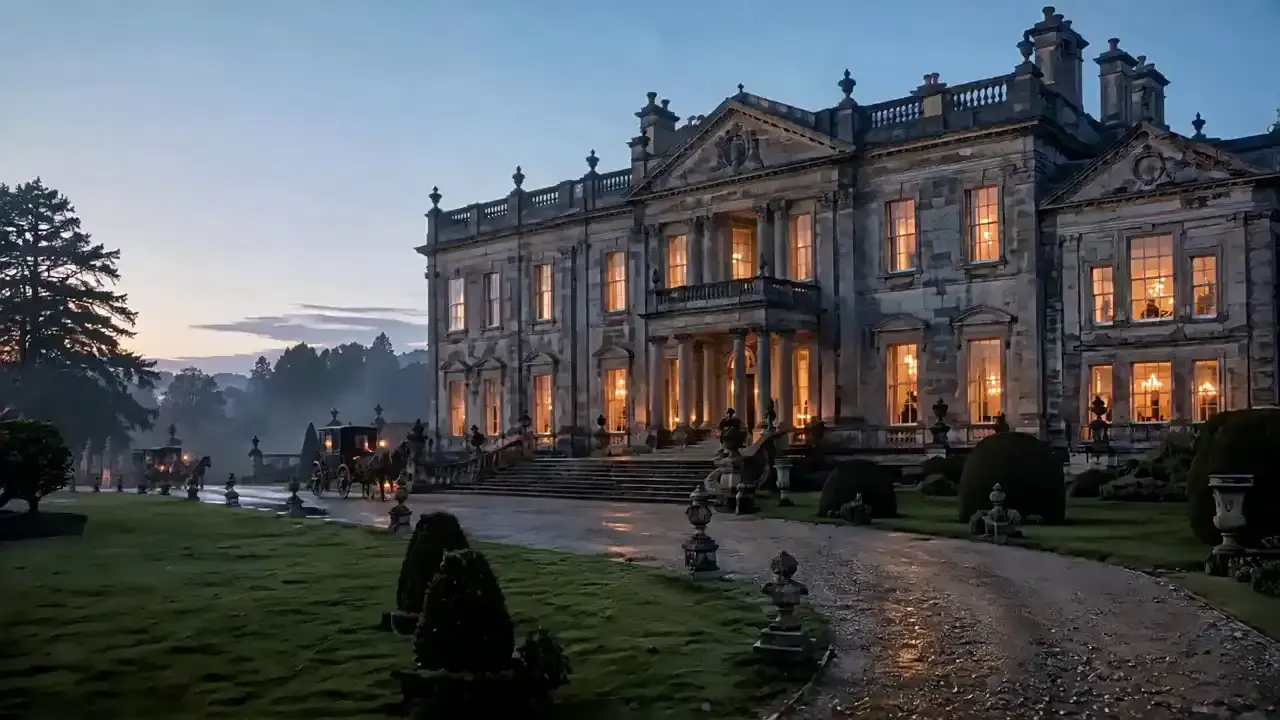
Twilight estate carriage arrival

Text to Video

15s · 1080p · 16:9 · audio on

Slow sweeping drone push-in toward a grand stone manor house at blue hour. Warm candlelight glows inside tall arched windows while a horse-drawn carriage rolls smoothly up the gravel drive through light evening mist. Hooves crunch on gravel, distant owls and soft orchestral strings.


Vertical e-commerce product showcase

Image to Video

8s · 1080p · 9:16 · audio on

Gentle handheld 9:16 camera move in a sunlit modern kitchen. The presenter smiles naturally toward the lens, raises the compact pink portable blender toward the foreground, and speaks enthusiastically about fresh morning smoothies. Crisp studio room tone and subtle ice-blend sound.

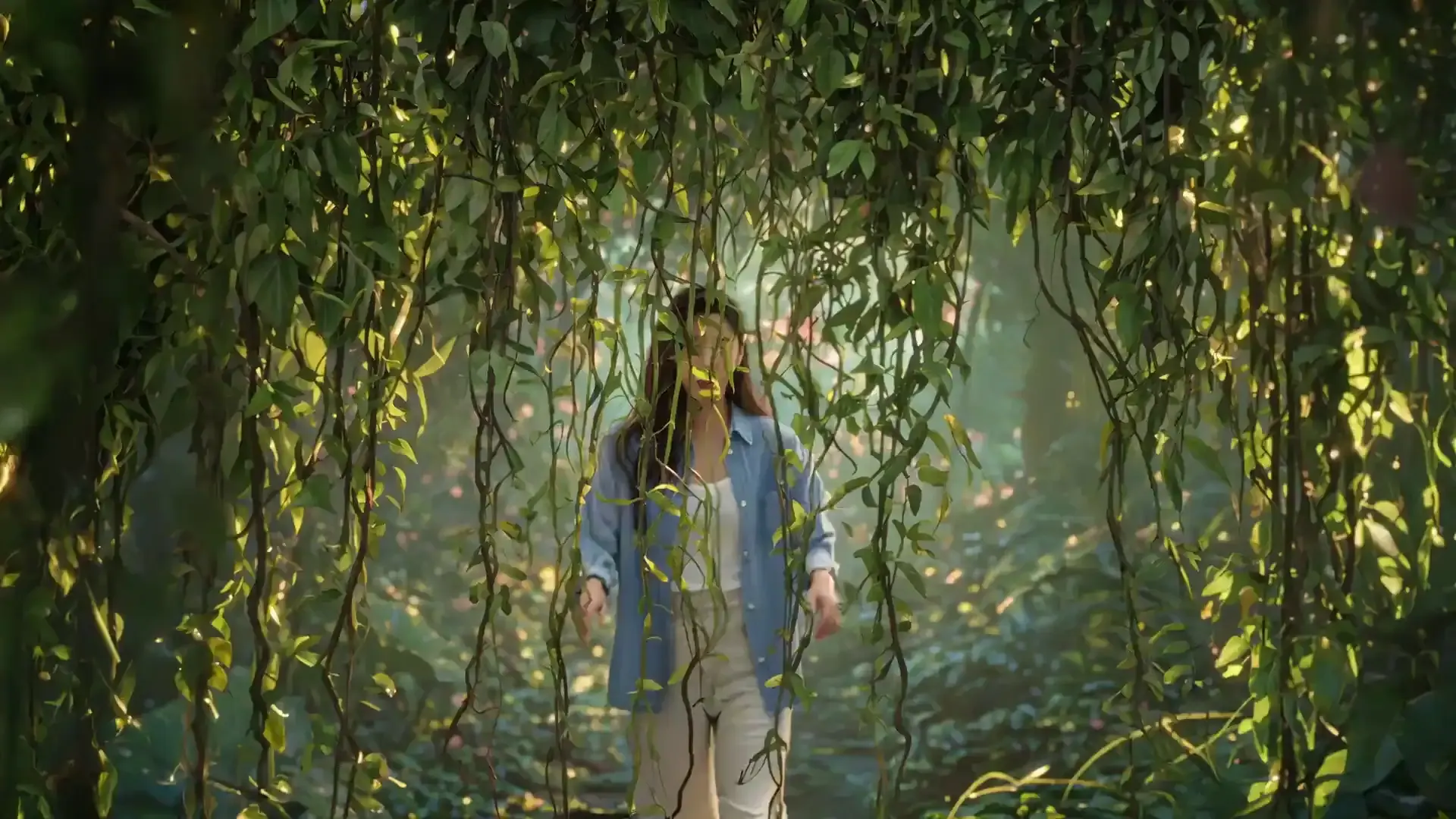
Sunlit forest walk tracking shot

Text to Video

20s · 720p · 16:9 · audio on

Continuous steadicam tracking shot following a woman walking forward through curtains of sunlit green hanging vines in a lush forest clearing. Golden afternoon rays flicker across her denim jacket as leaves sway in the breeze. Gentle footsteps on soft earth, rustling foliage and birdsong.

Minimalist boutique architectural tour

Image to Video

10s · 720p · Auto · prompt expansion on

Smooth gimbal glide moving slowly forward through a warm minimalist wooden retail interior. Afternoon sunlight shifts across textured plaster walls, oak counters and curated ceramics on display shelves. Quiet gallery acoustics and subtle ambient warmth.

Wan 3.0 pricing

Wan 3.0 is billed in Hushgen credits per second of video. Credits are shared with every model and come with plans and credit packs.

Wan 3.0 credits for Text to Video and Image to Video
ResolutionPer second2-second video5-second video10-second video30-second video
480p20 credits40 credits100 credits200 credits600 credits
720p40 credits80 credits200 credits400 credits1,200 credits
1080p80 credits160 credits400 credits800 credits2,400 credits
  • Wan 3.0 costs 20 credits/s at 480p, 40 credits/s at 720p and 80 credits/s at 1080p across both Text to Video and Image to Video.
  • Native synchronized audio is included in that rate—toggling Generate audio on or off does not change the credit cost.
  • New Hushgen accounts receive 50 free credits, enough to generate a 2-second 480p Wan 3.0 clip (40 credits); longer or higher-resolution clips require a subscription plan or a one-time credit pack.
See plans and credit packs

Wan 3.0 vs Wan 2.7 on Hushgen

Compare Alibaba’s Wan 3.0 with the previous Wan 2.7 generation as both are configured on Hushgen.

FeatureWan 3.0Wan 2.7
Duration per generation2–30 seconds (any whole second)2–15 seconds (any whole second)
Resolutions on Hushgen480p, 720p, 1080p720p, 1080p
Native audio generationOn by default, toggleable offCustom audio upload only
Prompt expansion on HushgenYes (optional toggle)No
Image to Video frame controlFirst frame + optional last frameFirst frame + optional last frame
Tools on HushgenText to Video, Image to VideoText, Image, Reference, Edit, Extend
5-second 720p clip200 credits240 credits
5-second 1080p clip400 credits360 credits

Choose Wan 3.0 for longer 16–30 second single takes, native synchronized audio, optional prompt expansion, or low-cost 480p drafts (20 credits/s).

Choose Wan 2.7 when you need Reference to Video, Video Edit, Video Extend, custom audio track uploads, or slightly cheaper 1080p clips under 15 seconds.

Limitations

What Wan 3.0 on Hushgen does not do, so you can decide whether it fits your project.

  • Hushgen currently exposes Wan 3.0 for Text to Video and Image to Video. Multimodal Reference to Video, document/URL inputs, Video Edit, Video Extend and Wan 3.0 Prime are not enabled here yet.
  • Single renders run from 2 to 30 seconds and export MP4 at 480p, 720p or 1080p without a 4K tier.
  • Image to Video requires a written motion prompt alongside your opening image and anchors start/end frames only (mid-clip keyframe lists are not supported).
  • Negative prompts and external audio file uploads are unavailable on Wan 3.0 Text and Image to Video; rely on the built-in Generate audio toggle instead.
  • Supported aspect ratios here are 16:9, 9:16, 1:1, 4:3 and 3:4 (21:9 cinema crop is not offered on Wan 3.0).
  • Requests that breach Hushgen’s Acceptable Use Policy are stopped by automated moderation.

Wan 3.0 FAQ

What is Wan 3.0?

Wan 3.0 is a multimodal video generation model developed by Alibaba Tongyi Lab and released globally in August 2026. It generates 2 to 30 seconds of 480p, 720p or 1080p video with synchronized native audio in a single pass.

Where can I run Wan 3.0 online?

Open this page to launch Wan 3.0 straight in your browser across Text to Video and Image to Video—or switch between Wan 3.0, 2.7, 2.6, 2.5 and 2.2 right from the Wan Model Series bar above the gallery.

Do I need an Alibaba Cloud account or Model Studio plan for Wan 3.0?

No. Everything runs on your Hushgen credit wallet, with no Alibaba Cloud registration, cloud billing or separate Wan membership required.

Is Hushgen affiliated with Alibaba or the official Wan site?

No. Hushgen is an independent platform that offers Wan 3.0. Hushgen is not affiliated with or endorsed by Alibaba.

How is Wan 3.0 priced on Hushgen?

Pricing scales strictly per second and resolution: 20 credits/s at 480p, 40 credits/s at 720p and 80 credits/s at 1080p across both Text and Image to Video, with native audio included free. A 5-second render takes 100 credits (480p), 200 credits (720p) or 400 credits (1080p).

Can I test Wan 3.0 before buying a plan?

Yes. Every new Hushgen signup starts with 50 complimentary credits—enough to render a 2-second 480p Wan 3.0 clip (40 credits). For longer durations or 720p/1080p exports, choose either a subscription or a one-time credit pack.

Does one Hushgen balance cover Wan 3.0 alongside other models?

Yes. Your credits spend interchangeably across Wan 3.0, Wan 2.7, Wan 2.6, Wan 2.5, Wan 2.2, Seedance 2.5, Kling 4.0, Magi 2, Veo 3.1 and all Hushgen image models.

Does Wan 3.0 generate native speech, sound effects and music?

Yes. Synchronized dialogue, ambient acoustics, foley and music are synthesized together with the video frames. Audio is enabled by default and can be muted in Advanced settings without changing credit cost.

How does first-and-last-frame animation work in Wan 3.0?

Switch the generator to Image to Video, upload your opening still, describe the motion, and optionally upload a closing frame so Wan 3.0 bridges cleanly between both compositions.

What changed between Wan 2.7 and Wan 3.0 on Hushgen?

Wan 3.0 doubles max length from 15s to 30s, builds synchronized audio directly into generation, introduces a prompt expansion toggle and re-adds budget 480p drafts (20 credits/s). Wan 2.7 stays available whenever you want Reference to Video, Video Edit, Video Extend or cheaper 1080p renders up to 15s.

Are Wan 3.0 Reference to Video or Wan 3.0 Prime supported here?

Not yet. Hushgen currently runs standard Wan 3.0 for Text to Video and Image to Video. If your workflow needs multi-asset Reference to Video up to 30 seconds today, switch to Magi 2, Kling 4.0 or Seedance 2.5 on the same balance.

Can I share a pre-filled Wan 3.0 prompt link?

Yes. Pass query strings to preload the workbench—for instance /wan-3-0?model=alibaba/wan-3.0/text-to-video&duration=10&quality=720p&prompt=Golden%20hour%20train%20passing%20coastal%20cliffs. Accepted keys include model, tab, duration (2–30), quality (480p, 720p, 1080p), audio=0 and prompt.

Can I cancel my subscription or get a refund?

You can cancel a subscription yourself at any time in your account. If you have not used any credits from a payment, email [email protected] within 7 days of the charge for a full refund. A payment cannot be refunded once its credits have been used or after 7 days.

Last updated by the . Model information is based on the developer’s public announcement and on how Wan 3.0 is configured on Hushgen. Sources: Alibaba Cloud Model Studio: wan3.0-video Model Information.

Sample videos are official Wan 3.0 demonstration clips. Wan 3.0 is a trademark of its owner. Hushgen is an independent platform and is not affiliated with Alibaba Tongyi Lab. Disclaimer